One important thing to add to your pre-travel checklist is to arrange for your mail and package deliveries to be held while you’re away. It’s an easy step to forget… until you remember you’ve got a box sitting on your porch for three days advertising “free stuff inside.”
I’ve compiled a guide on how to do this using different services, such as USPS (free mail holding), UPS (which can charge for the service), and Amazon (which doesn’t “hold” packages, but does allow delivery to alternate locations like lockers).
If you know something’s coming via FedEx while you’re out of town, there’s a simple option that’s worth knowing about.
FedEx Vacation Hold (Free, and built into Delivery Manager)
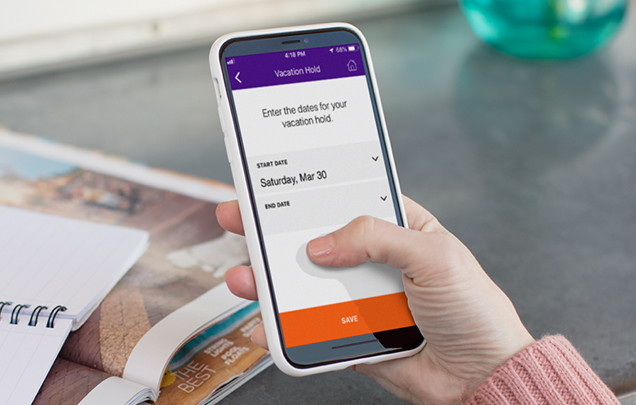
FedEx offers a Vacation Hold feature through FedEx Delivery Manager (their free package-management service). If you’re traveling, you can set a date range and have eligible packages held until you’re back.
Here’s the quick version:
Step 1: Sign up for (or log into) FedEx Delivery Manager. Once you’re in, look for Vacation Hold in your profile. You can also find it under Manage Delivery from certain shipment notifications.
Step 2: Choose the start and end dates that match your trip. FedEx will suspend eligible deliveries for that range (up to 14 days) and resume deliveries after your end date.
Step 3: Double-check your dates, then confirm the hold.
A few important “fine print” details
- It’s for residential deliveries (not every type of FedEx shipment qualifies).
- Only FedEx Express and FedEx Ground packages are eligible.
- The hold is up to 14 days. If you’re gone longer than that, you may need a different plan (see below).
- It generally won’t affect deliveries scheduled for the same day you submit the request—so don’t wait until you’re already pulling out of the driveway.
- It applies to the address (so it can affect other people in your household, too).
What if you’ll be gone longer than 14 days?
If you’re taking a longer trip (or you don’t want all deliveries paused), another approach is to redirect a specific package to be held for pickup at a FedEx location. That’s a separate option from Vacation Hold, but it can be a good workaround if you only care about one delivery (or you want to control things package-by-package).
Final Thought
I’m always surprised when large corporations make customer-friendly changes… but this is one of those “why doesn’t everyone do it this way?” features. It’s far easier to pause deliveries than to worry about porch pirates, beg a neighbor to grab boxes, or come home to a stack of soggy cardboard.
The bigger challenge, of course, is that when you order something online, you don’t always get to choose the carrier. But if you do know a shipment is coming via FedEx and you’ll be away, Vacation Hold is a simple (and free) way to keep packages from becoming a welcome-home surprise… for someone else.
Want to comment on this post? Great! Read this first to help ensure it gets approved.
Want to sponsor a post, write something for Your Mileage May Vary, or put ads on our site? Click here for more info.
Like this post? Please share it! We have plenty more just like it and would love it if you decided to hang around and sign up to get emailed notifications of when we post.
Whether you’ve read our articles before or this is the first time you’re stopping by, we’re really glad you’re here and hope you come back to visit again!
This post first appeared on Your Mileage May Vary

1 comment
I love this feature, but it’s unfortunately very unreliable. It worked well for us at an old address, but at our current address, they never follow the hold and deliver anyway.