If you have multiple Chase credit cards, there’s a good chance your credit limits aren’t exactly where you want them.
Maybe one card has way more credit than you’ll ever use, while another is the one you actually put most of your spending on.
Until recently, fixing that meant calling Chase and asking for a manual adjustment. Now, there’s a much easier way to handle it yourself.
What Chase’s “Move Available Credit” Feature Does
Chase now allows you to move credit lines between your own cards online, with no credit check, no fees, and instant updates.
The feature lets you shift available credit from one card to another, as long as both cards are eligible. Chase explains how the feature works on its website, but the actual process is even simpler than it sounds.
You can do this either on Chase’s website or directly in the mobile app.
Why You Might Actually Want To Do This
At first glance, this sounds like a niche feature. But it’s surprisingly useful.
Now, to be fair, I’m not someone who constantly worries about my credit utilization. My overall available credit is high enough that small shifts between cards don’t really move the needle for me.
That said, I know plenty of people who are much more focused on keeping their utilization as low as possible—especially on individual cards—and for them, this feature could be really helpful.
But in my case, the reason I moved credit wasn’t about my credit score. It was about making one specific card easier to use day-to-day.
I had a large credit line on my IHG Premier card—way more than I’d ever realistically use. Meanwhile, my World of Hyatt card had a much lower limit, even though that’s the card I actually try to put meaningful spend on each year.
And since I need to spend $15,000 on the Hyatt card to earn an extra free night, that lower credit limit wasn’t ideal.
By moving credit over, I increased my available credit on the Hyatt card, lowered my utilization on that card, and made it easier to put larger purchases on it without thinking twice.
How The Process Works
Chase makes this surprisingly simple.
- Step 1: Choose the card you want to increase the credit limit on
- Step 2: Select which card(s) you want to move credit from
- Step 3: Enter the amount (in set increments)
- Step 4: Confirm and submit
That’s it. The whole process took me just a couple of minutes, and the updated credit limits showed up immediately.
My Real Example
In my case, I moved $10,000 from my IHG Premier card over to my World of Hyatt card.
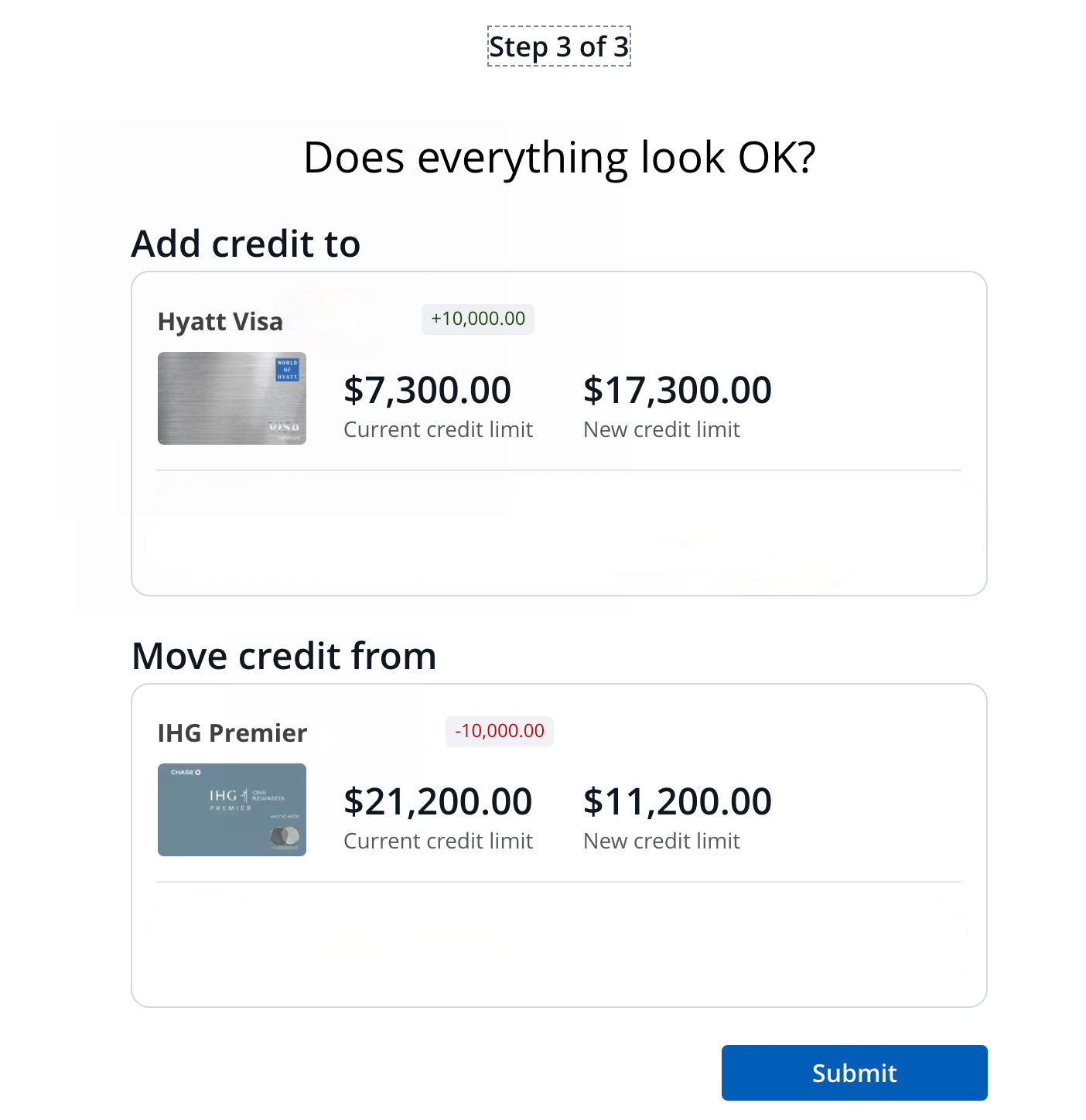
That gave me a much more usable credit limit on the card I actually spend on—without opening a new account or requesting a credit line increase.
A Few Things To Know Before You Do This
There are some limitations to keep in mind:
- You can’t reduce a card below its required minimum credit limit (for example, Visa Signature and Visa Infinite cards have minimum limits)
- You can only move credit between similar card types (personal to personal, business to business)
- Some newer accounts or promotional offers may not be eligible
- There may be limits on how often you can move credit
Also important: moving credit does not change your total credit or what you currently owe.
Why This Matters More Than It Seems
This is one of those small features that can quietly make a difference.
If you’re trying to hit a spending threshold, keep utilization low on a specific card, or just make your “everyday” card more usable, it’s an easy fix that doesn’t require a hard pull or a phone call.
Final Thought
Most people never think about their credit limits after they’re approved.
But if you have multiple Chase cards, those limits don’t have to stay static.
Sometimes, the easiest way to optimize your setup isn’t opening a new card. It’s just moving things around on the ones you already have.
Want to comment on this post? Great! Read this first to help ensure it gets approved.
Want to sponsor a post, write something for Your Mileage May Vary, or put ads on our site? Click here for more info.
Like this post? Please share it! We have plenty more just like it and would love it if you decided to hang around and sign up to get emailed notifications of when we post.
Whether you’ve read our articles before or this is the first time you’re stopping by, we’re really glad you’re here and hope you come back to visit again!
This post first appeared on Your Mileage May Vary


4 comments
@Joe, I can’t move my IHG Select (legacy) credit line to any card online. It’ll gladly *accept* moves from other cards, though. Haven’t called to see if it’s any different, but as a sock drawer card, its credit line would be more useful elsewhere (Sapphire, Freedom, Hyatt, IHG Premier, etc.). YMMV.
Same thing here. I didn’t check every card before writing the post, but the IHG Select isn’t an option for either of us to transfer credit to another card.
The chase instructions contain no details as to how to do it online. Neither does your post.
To see the instructions, click the Chase link in the post and log in to your account. From there, you’ll see the process is as simple as selecting the cards linked to your Chase profile.