Renting from Hertz at a major airport may come with something new: AI-powered damage scanners. But if that concerns you, the real question isn’t whether to avoid Hertz—it’s where you rent from.
Whenever I write about Hertz, it’s almost guaranteed that someone brings up the company’s new AI damage scanners.
And honestly, I get it.
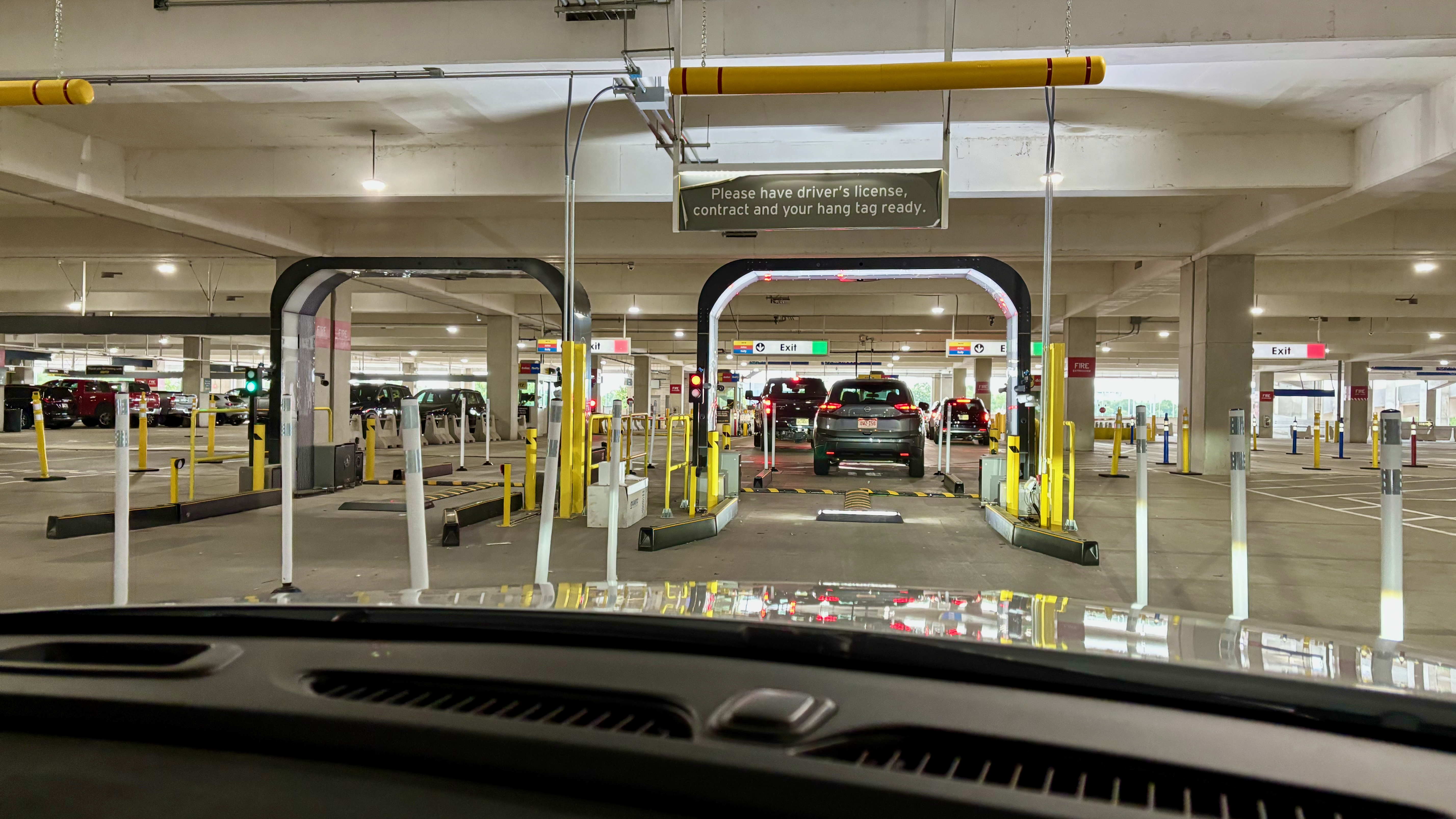
After seeing one in person at Austin-Bergstrom (AUS), I’ll admit I changed my behavior. On our next trip there, I specifically avoided renting from Hertz, Dollar, or Thrifty.
But after thinking about it more, I realized there’s a better question than simply, “Should I boycott Hertz?”
If the scanners are what bother you most, do you really need to avoid Hertz entirely—or just avoid the places where the scanners are most likely to be?
What Hertz Is Actually Using
Hertz now uses what it calls Digital Vehicle Inspection (DVI), powered by UVeye. According to Hertz’s support page, the system uses AI and imaging technology to scan a vehicle’s body, glass, tires, and undercarriage, then compares condition reports from the start and end of the rental.
That sounds great in theory. Faster inspections. Better documentation. Less room for “he said, she said” disputes. But the traveler reaction has been a lot less enthusiastic.
Reports from outlets like The Drive, Car and Driver, and MotorTrend have highlighted cases where renters were billed for minor damage—sometimes with added administrative and processing fees. At the same time, industry coverage suggests that the vast majority of rentals still don’t result in damage claims, underscoring how different the experience can be depending on the situation.
Are These Scanners Everywhere?
No. At least not yet.
When Hertz and UVeye announced their partnership, they said the rollout would begin at major U.S. airport locations. Hertz also said it planned to bring the technology to roughly 100 U.S. airport locations. You can read that in the official announcements from Hertz and UVeye.
That tells us two important things:
- The focus is on airport rentals, not neighborhood locations
- The rollout is still incomplete, which means not every Hertz location has these scanners
That lines up with later reporting. In 2025, lawmakers looking into the system cited reports saying Hertz was already using the scanners at at least six U.S. airport locations and planned to expand further. See the letters and statements from the House Oversight Committee and Sen. Richard Blumenthal’s office.
Why This Doesn’t Automatically Mean “Never Rent From Hertz Again”
This is where I landed after digging into it. I don’t think the presence of scanners automatically means you need to boycott Hertz, Dollar, or Thrifty. What it probably means is that you should be more selective.
If your main concern is being run through an automated damage system, the real issue may not be the brand itself. It may be where you’re renting.
Because if Hertz is concentrating these systems at larger airport locations, then avoiding those locations may do more for you than avoiding the company entirely.
How To Lower Your Chances Of Encountering One
Book a neighborhood location instead of the airport
Based on Hertz’s description of the rollout, airport locations are the priority. Neighborhood and local locations do not seem to be the focus. That makes sense. These systems are expensive, and the business case is much stronger at high-volume airport lots than at a smaller local branch.
So if you want the simplest way to avoid the scanners, start by checking whether there’s an off-airport Hertz location that works for your trip.
Smaller airports may be a safer bet than major hubs
The company has discussed deploying the scanners at major airports. So if you’re flying into a smaller airport, or even a secondary airport in the same metro area, there’s a decent chance you’re less likely to encounter one there than at a giant consolidated rental center.
That doesn’t guarantee anything. But if you’re trying to reduce the odds, smaller airports are probably a better bet than the biggest hubs.
Remember that Dollar and Thrifty are part of the same group
Hertz, Dollar, and Thrifty all sit under the same corporate umbrella. So if the scanner issue is your concern, switching from Hertz to Dollar or Thrifty at the same airport may not really solve the problem.
The Frustrating Part: Hertz Doesn’t Publish a Location List
This is what makes the whole thing harder than it should be. As far as I can tell, Hertz has not published a public list of which locations currently use the AI scanners. The company explains how the technology works, but not where you’ll encounter it.
So if you’re trying to avoid scanner-equipped locations, you’re stuck doing what travelers always end up doing when official information is incomplete:
- Searching Reddit threads
- Checking FlyerTalk
- Reading recent Google reviews for a location
- Looking for recent blog posts or news reports
In other words, you’re relying on crowdsourced information. That’s not ideal, but it’s probably the best option right now.
How To Research An Airport Before You Book
If you want to know whether a specific airport location might have one of these scanners, I’d try a few quick searches before booking:
- “Hertz AI scanner [airport code]”
- “Hertz UVeye [airport code]”
- “Hertz damage scanner [airport name]”
Then I’d check the date on whatever comes up.
That last part matters because this rollout is still expanding. A post or comment from months ago saying a location didn’t have scanners may no longer be accurate.
I’d also pay attention to patterns. If travelers are only mentioning scanners at large airport lots and not at local branches, that tells you something, even if you can’t confirm every single location individually.
If You Can’t Avoid Them, Protect Yourself
Sometimes the airport location is the only practical option. I get that. If that’s the case, I wouldn’t panic—but I would be more careful.
That means doing the same things experienced renters already know to do, only more consistently:
- Take photos and video of the car at pickup
- Get close-ups of wheels, bumpers, the windshield, and the lower panels
- Take another full set of photos and video when you return the car
- Keep the rental paperwork and any return confirmation
If the company is using an automated system to compare before-and-after conditions, then you want your own before-and-after record too.
That’s true whether the damage claim ends up being fair, unfair, minor, or something that was already there.
My Take
Seeing the scanners in Austin definitely made me uneasy, and I’ll admit it affected my next booking decision. On a subsequent trip, I avoided renting from Hertz, Dollar, or Thrifty because I didn’t want to go through that process again. But after looking into it more, I don’t think the most rational response is necessarily to swear off Hertz entirely.
I think the smarter response is to be more selective about where you rent. If the scanners are what concern you, the goal shouldn’t be to avoid Hertz at all costs. It should be to avoid the locations where these systems are most likely to be in place. In practice, that probably means looking at smaller airports, off-airport branches, or even a different company if the rental setup at a major airport seems like exactly the kind of place where this technology would be deployed.
And if you do end up renting from Hertz at a larger airport, I’d go in assuming you may be dealing with a much more automated damage-review process than you used to. That doesn’t automatically make it a bad rental experience, but it does mean documentation should be part of your routine, not something you only think about if a problem comes up later.
Final Thought
Whenever a travel company introduces new technology, the promise is usually the same: faster, smoother, and more transparent. Sometimes that’s true. But sometimes it also means the burden shifts to the customer to prove what happened, especially when the process becomes more automated and there’s less room for a human to step in and use common sense.
So if Hertz’s AI scanners are the reason you’re hesitant to rent with them, I don’t think that means you need to boycott the company. I do think it means you should be strategic. Choose your location carefully, use crowdsourced information when Hertz doesn’t provide enough detail, and, if you do rent at a large airport, document everything as if you expect a machine to review it later. Because there’s a good chance one will.
Want to comment on this post? Great! Read this first to help ensure it gets approved.
Want to sponsor a post, write something for Your Mileage May Vary, or put ads on our site? Click here for more info.
Like this post? Please share it! We have plenty more just like it and would love it if you decided to hang around and sign up to get emailed notifications of when we post.
Whether you’ve read our articles before or this is the first time you’re stopping by, we’re really glad you’re here and hope you come back to visit again!
This post first appeared on Your Mileage May Vary

2 comments
Yes avoid Hertz. They are empowering their locations to commit Fraud. END OF STORY
While this makes for a good article (thank you), the rational response is in fact to simply avoid Hertz/Dollar/Thrifty in a blanket manner because this too much to worry about, even for folks that enjoy comparing car rental options.